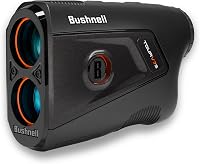
Bushnell Golf Rangefinder: Switch From Meters to Yards
To switch a Bushnell rangefinder from meters to yards, find the units setting for your model and choose yards. Button steps differ by model, so check the manual before you press anything.
On this page (8 sections)
- Check whether your Bushnell is on meters
- Switch a Bushnell rangefinder from meters to yards
- Why meter readings can lead to the wrong club
- Common distances in meters and yards
- When should you leave a Bushnell on meters?
- Make the units check part of your pre-round routine
- What to do if the buttons don't respond
- Pick yards or meters for your Bushnell rangefinder
A Bushnell rangefinder that shows numbers smaller than you expect may be set to meters, and switching it back to yards takes one setting change. A meter reading and a yard reading give different numbers for the same flag, so the wrong unit can send you to the wrong club.
This guide shows how to spot the setting, switch it to yards and confirm the change. How to use a Bushnell golf rangefinder on the course covers the rest of the routine, and the golf rangefinders buying guide covers other brands.
Check whether your Bushnell is on meters
Your Bushnell is on meters if a target about 100 yards away reads near 91. A meter reading runs about 9% lower than a yard reading for the same spot, so that gap is the quickest check.
One yard is 0.9144 meters, so 100 yards is about 91 meters. Flip it around, and 100 meters is about 109 yards.
The same gap shows up at any distance. A flag 150 yards away reads about 137 on meters, and a 180-yard shot reads about 165.
If your model shows a unit symbol on the screen, read that first and skip the math. Keep a known distance handy for the check, such as a yardage marker on a course you already know.
Switch a Bushnell rangefinder from meters to yards
Find the units setting, then choose yards. Bushnell's button steps differ from model to model, so the manual for your unit has the final word.
Depending on the model, the setting may sit in a short menu or behind a press-and-hold on a button, so look for both before you give up. The general steps look like this:
- Turn the unit on.
- Find the units option, either in a menu or behind a press-and-hold on a button.
- Choose yards.
- Leave the menu and aim at a known target to confirm the change.
Bushnell buttons can do more than one job. On the A1-Slope, for example, the mode button toggles slope on and off, so don't copy another model's button presses.
The Tour V6 Shift has its own external slope switch, and it comes with a manual in the box. The Tour V6 Shift review covers the rest of that model.
The newer V7 Shift is a separate model with its own manual, so don't assume the V6 steps carry over. Bushnell Tour V6 Shift vs V7 Shift: What Changed? covers the differences.
Bushnell's home page is the place to look for a manual for your exact model.
Confirm meters or yards on a Bushnell rangefinder
Pick a target with a known distance, such as a yardage marker or a sprinkler head on a course you know, and read the number on your unit. If it reads close to the yard figure, the unit is on yards.
If it reads about 9% lower, the unit is still on meters. Check two or three targets, so one odd reading doesn't fool you.
If the unit still shows meter figures after you choose yards, go back to the setting and confirm which option you picked. Then repeat the check before you trust the numbers.
Why meter readings can lead to the wrong club
Read a meter number as yards and you underestimate the distance by about 9%. Taking 150 meters as 150 yards, for example, leaves you about 14 yards short of the real distance.
150 meters works out to about 164 yards. A 14-yard gap can be the difference between two clubs, depending on your distances.
The gap also grows with distance. A 50-yard shot reads about 46 on meters, while a 200-yard shot reads about 183, so the error gets bigger on longer approaches.
Models that adjust their numbers make a units mismatch easy to miss. Bushnell says the Pro X3+ adds temperature and altitude to its slope numbers, and a compensated number on the wrong unit still looks plausible.
Pick one unit before you tee off, and keep it the same for the whole round. Switching units partway through a round invites mistakes on the next shot.
Common distances in meters and yards
The table below shows common distances in both units, so you can check a reading against a row. Each number is rounded to the nearest whole unit.
| Meter reading | About yards | Yard reading | About meters |
|---|---|---|---|
| 100 | 109 | 100 | 91 |
| 120 | 131 | 120 | 110 |
| 150 | 164 | 150 | 137 |
| 180 | 197 | 180 | 165 |
| 200 | 219 | 200 | 183 |
Most US courses mark distances in yards, so a meter setting is usually the one to change before you play.
For a quick estimate, add about 9% to a meter reading to get yards, or subtract about 9% from a yard reading to get meters. The rule of thumb is close but not exact, so use the table when the number matters.
When should you leave a Bushnell on meters?
Leave it on meters if the course you're playing marks its distances in meters. Then the number on your display matches the plates, and you don't convert anything.
Some courses outside the US mark distances in meters, so look at the first distance marker you pass. If it matches your display, you're set.
Whichever unit you pick, make sure your yardage book, scorecard and rangefinder all use the same one. Mixed units are where the 9% mistake comes from.
Make the units check part of your pre-round routine
Check the units once before each round, because a unit set to meters stays that way until you change it. Turn the unit on, look at the units, then start your round.
A few seconds at the first tee saves a wrong number on the first approach. If you borrow a playing partner's rangefinder, check its units before you trust a number, since it may be set differently from yours.
If the unit rides loose in your bag, a hard case helps protect it between rounds. This one names many Bushnell Tour models, so match the model to your rangefinder before you buy.
What to do if the buttons don't respond
If the buttons do nothing, check the battery before you change any settings. The Bushnell rangefinder battery guide explains the cell type and how to swap it.
If the unit still won't respond after a new battery, the not working fixes cover the next steps in order.
Pick yards or meters for your Bushnell rangefinder
Pick yards if you play in the US, where courses mark distances in yards. Pick meters only if your course marks distances in meters.
Set the unit before the first tee, and use a known target to confirm it. If it reads about 100 when you aim at a 100-yard marker, you're on yards, and if it reads about 91, switch the units before you play.
If you're still choosing a model, the best Bushnell golf rangefinders, model by model compares the lineup.
Frequently asked questions
How do I change a Bushnell rangefinder from meters to yards?
Find the units setting for your model, choose yards, and check the display before you head to the first tee. Button steps differ by model, so use the manual for your exact Bushnell rangefinder, then aim at a known marker to confirm the change.
How can I tell my Bushnell rangefinder is on meters?
Aim at a target you know is about 100 yards away. If the screen shows a number near 91, the unit is on meters, since a meter reading runs about 9% lower than a yard reading for the same spot.
How many yards is 100 meters?
100 meters is about 109 yards, because one meter equals roughly 1.09 yards. So if your unit shows 100 on the meter setting, the real distance is about 109 yards, and you need to pick a club for that longer shot.
Is a rangefinder reading wrong if it looks short?
Not always, because a unit set to meters shows smaller numbers than the same distance in yards. Check the units setting first, and only if the numbers still look wrong should you move on to the not-working steps for your model.