How to Use a Golf Rangefinder, Step by Step
To use a golf rangefinder, aim at the flag, wait for the lock signal and read the yardage. Then check the slope reading if your unit has one and your round allows it.
On this page (6 sections)
To use a golf rangefinder, aim at the flag, wait for the lock signal, read the yardage and put the unit away when the hole is done.
The routine is similar across models, but button names, modes and cases differ. The steps below use examples from models on this site, and if you're also comparing a hunting model, golf rangefinder vs hunting rangefinder explains how the two differ.
Read the quick-start guide that comes with your unit before the first round. If you've lost it, start at the maker's website, such as Bushnell or Callaway.
Before you walk to the ball
Check the battery, clean the lens and set the mode before you start the round. Those three checks take less time than the first hole.
Step 1: Turn it on and focus the eyepiece
Press the power button and look through the eyepiece. If your unit has a diopter or focus ring, as the Nikon COOLSHOT PROIII Stabilized does, turn it until the display and the target look sharp.
Do this once at home, so you know where the ring sits before you need it on the course.
Step 2: Find the flag with your golf rangefinder
Put the flag in the middle of the view, and aim at the flag itself, not at the green around it. The flag is the target the number should match.
Stand where the flag is clearest. A bush or a cart in front of you can block the view, so shift a step to the side before you press.
Step 3: Use a steady stance before you press
Brace your feet, keep your elbows close to your body and hold the unit with both hands if you can. A steady stance gives the lock a better chance on the first try.
On a model with image stabilization, such as the Nikon COOLSHOT PROIII Stabilized, the view is steadier, but a good stance still matters.
Lock onto the flag and read the number
Press the measure button, wait for the lock cue, then read the number and its units. The lock cue is the step most new users skip, so take a second before you look at the screen.
Step 4: Press to measure, or switch to scan
On the REDTIGER, a brief press of the button changes the measuring mode, and one of the six modes is continuous scan. Use a single measure when you want the flag, and switch to scan when you want readings across a green or a line of trees.
Keep the mode you used last in mind before the next press, since the same button can give a different kind of reading.
Step 5: Wait for the lock cue
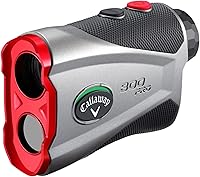
The Callaway 300 Pro uses Pin Acquisition Technology to lock onto the pin up to 300 yards away, and its Pulse feature sends a short vibrating burst to confirm the distance.
Learn your own unit's cue the same way, whether it's a vibration, a flashing ring or both.
Step 6: Read the yardage and the units
Read the number on the display, then check whether it shows yards or meters. The Callaway 300 Pro measures in yards or meters, so a quick glance before you pick a club avoids a mix-up.
If the number looks too long or too short for the club you have in mind, measure the flag again before you commit. A second reading costs a few seconds and can save a club.
Set slope before you measure, if the round allows it
Set the slope switch or mode before you measure, then confirm it on the display before you read the number. Slope can change the number the most on a hill, so it deserves a second look.
Step 7: Set the slope switch
On the Callaway 300 Pro, the slope on/off switch is external, so you can set it before you raise the unit.
What is slope on a golf rangefinder? explains what the adjusted number means, and how to use a Bushnell golf rangefinder on the course covers the steps on a Bushnell.
Before an event, read are golf rangefinders legal? so you know what your event allows.
Clean the lens and put it away
Wipe the lens before each round, then store the unit in a case or on a magnetic holder between shots. A few seconds of care keeps the view clear for the next flag.
Step 8: Clean the lens with a lens pen
Nikon's lens pen is made to remove fingerprints and dust from optics, and its soft brush retracts into the pen body to stay clean. Wipe the lens before the first hole, since a smudge can soften the view you need to find the flag.
Step 9: Store it in a case or on a holder
A hard case keeps the lens and buttons safe in a bag. The JAWEGOLF hard shell case has a carabiner and a belt loop, and it fits the Callaway 300 Pro and several Bushnell models.
If you'd rather mount the unit on the cart, how to attach a rangefinder to a golf bag or cart and the best golf rangefinder cases and magnetic holders cover the options.
Four slips to avoid on the first few holes
Watch for the lock cue, the mode on the screen, the lens and the battery, since those four slips are easy to make early on. Each one takes only a moment to check.
Reading a tree instead of the flag
If the flag sits in front of trees, the beam can reach the wrong object. Wait for the lock cue, and aim again if the number jumps.
How does a golf rangefinder work? explains how the laser picks its target, which is why the trees can take the reading.
Forgetting the slope mode
Check the mode before you read the yardage. On a hill, a slope-adjusted number and a straight-line number can differ by several yards.
Skipping the lens check
A smudged lens can soften the view, so wipe it before you start the round.
Skipping the battery check
Check the power before you leave the car. The REDTIGER charges over USB-C, and the Callaway 300 Pro comes with a battery included, so know which routine your unit needs.
Use a golf rangefinder the same way every hole
Use the same order every hole: aim at the flag, wait for the lock, read the number, then check the mode. The order matters more than speed, and it becomes automatic after a few rounds.
Practice the routine on a flat hole or at a range before you use it on the course. Learn the flag lock first, then add slope and the case, since each step builds on the one before.
If you're new to rangefinders, how to choose your first golf rangefinder helps you pick a model before you practice this routine. The complete golf rangefinder buying guide puts the whole category in one place.
Frequently asked questions
How do you use a golf rangefinder for the first time?
Check the battery, press the power button and look through the eyepiece until the flag looks sharp. Wait for the lock cue, read the number, and practice on a flat hole before you rely on the unit during a round.
How do I know the rangefinder has locked onto the flag?
Watch for the lock cue, which tells you the reading is on the flag. Some units vibrate, some flash a ring and some do both, so learn your unit's cue before the first round, and aim again if the number jumps between two values.
What should I do if the reading looks wrong?
Check which object the beam hit, since trees and objects behind the pin can take the reading. Confirm the mode on the screen too, and measure again from a spot with a clearer view of the flag before you pick a club.
How do I clean the lens on a golf rangefinder?
Wipe away fingerprints and dust before each round with a lens pen or a microfiber cloth. Nikon's lens pen has a soft brush that retracts into the pen body, and you should avoid rubbing grit across the lens, because it can scratch the coating.
Where should I keep the unit during a round?
Keep it in a hard case or on a magnetic holder, close enough to reach and protected from knocks. A case with a carabiner or belt loop keeps the unit close without letting it bounce against the cart or the bag.